Common Troubleshooting Steps
As you use these pro kit features, especially in the early days as the software is still undergoing lots of bug fixing, you may need to take occasional troubleshooting steps.
Disconnecting all boards from your computer, turning “master” off in your project, and then turning it back on and re-connecting the boards one at a time is a great step to get back to working order if things aren’t going as expected.
You can also always try hitting the reboot button on the boards to see if a quick reset fixes your problems. This especially helps when you first plug in the control board and you don’t see any status lights, be sure to give the reboot button a press in that case to “wake it up.”
You can always get support as well:
- The best way to get help is in the Bottango Discord community. Bottango developers and users all help each other out there.
- You can reach out to contact@bottango.com as well.
“Factory Reset” a Control Board
While using the control boards, you can set them into different modes: Exported Animation Mode, Wireless Connection Mode, Create Wireless Bridge Mode, etc.
If you find yourself stuck, and can’t connect to your board, you can always do a “factory reset” to bring it back to the default configuration of live control over a USB connection.
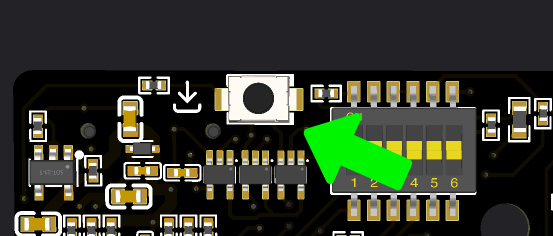
On the back of each board is a small “Factory Reset” button. It is in a different position on each board, but has the same icon. Here is the button on Bottango Solar:
First quit Bottango so that you are not connected to the board, but plug the board into your computer over USB so it is getting power.
If you are on version 0.7.1p4a or earlier: Press the reboot button on the front of the board, then press and hold the small factory reset button on the back of the board for 3 seconds (make sure you are not pressing the reset button at the same time).
If you are on version 0.7.1p6a or later: Press the reboot button on the front of the board, then press the small factory reset button on the back of the board 5 times quickly.
When the reset occurs, the three status lights at the top of the board will flash white quickly. Release the factory reset button, then the board will reboot in the default configuration.
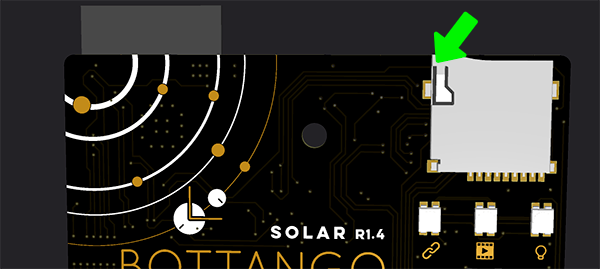
While your Bottango Solar is mounted on your Captain Cogbrow animatronic kit, you can still access the factory reset button. It is located on the back of the board, right at the top, opposite the left side of the SD card reader.