
Use Cases and Recommendations
Not sure which hardware is right for you? Here are a few example builds and the recommended Bottango control boards for each one.
Ten-Servo Single Figure with Audio
Section titled “Ten-Servo Single Figure with Audio”“I’m building an animatronic with 10 servos that should play audio. I want easy integration with Bottango that just works.”
-
My animatronic uses 10 PWM servos (and a total combined current draw on the servos under 7A).
-
My animatronic should play audio files when triggered by Bottango software.
-
I want to be able to use the animatronic while it is connected to a computer and export animations to play standalone without a computer.
-
I want to be able to trigger an animation to play with a button press.
Recommended Hardware:- 1x Bottango SolarWith 10 servos or fewer, you can control everything with one Bottango Solar if you stay within current limits. You can use all 10 servo headers on Bottango Solar to control the PWM servos, and use the onboard audio hardware and SD card reader to read and play back audio files. You can connect Bottango Solar to your computer and animate.

You can export finished animations onto the SD card and play back animations without a connected computer. The three trigger buttons let you play animations with a button press.

Four-Servo Simple Learning Animatronic
Section titled “Four-Servo Simple Learning Animatronic”“I’m learning Bottango. I have 4 servos in my figure, and am happy to keep a connected computer. I can just use the speakers on my computer for audio. I really just want something ‘ready to go’ with Bottango so I can learn!”
-
My animatronic uses 4 PWM servos.
-
I’m just learning, and I want to have something ‘ready to go’ with Bottango. I can keep a computer connected.
Recommended Hardware:- 1x Bottango ImpulseBecause Bottango’s firmware is open source, you can create your own custom build using a general-purpose ESP32 development board and add similar features “from scratch.” However, you can alternatively use Bottango Impulse as a standalone “ready to go” ESP32-based animatronic controller with integrated PWM servo controls.
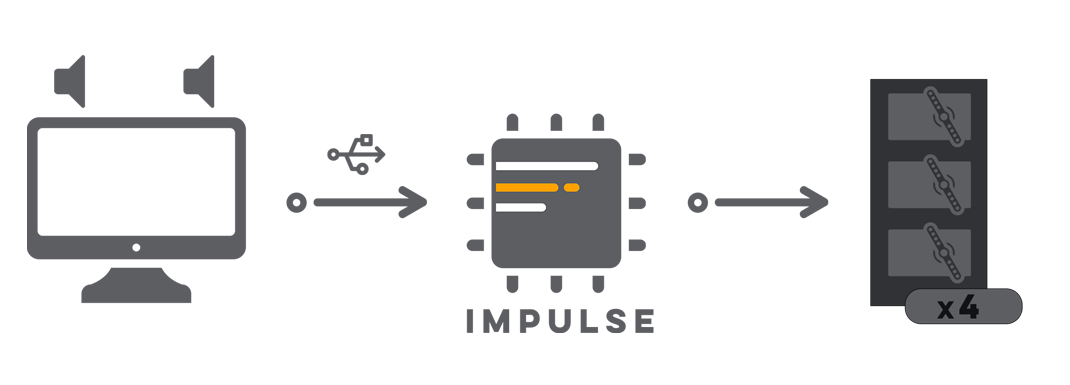
The advantage of using Bottango Impulse in this scenario is that you’ll get all the control board’s features ready to go. You’ll also be able to update the board’s software directly in the app rather than building and flashing from source files, and you’ll have less to learn and design yourself. You’ll be able to hit the ground running more easily, with potentially easier support because you’re using standardized hardware rather than a custom build.
That being said, building out your own hardware isn’t just supported, it’s encouraged! If you want to take on that challenge and learn, you’ll grow a lot as a robot builder. The right road forward is up to you.
24-Servo Dual-Figure Animatronic Show
Section titled “24-Servo Dual-Figure Animatronic Show”“I’m building a show with two animatronics. One has 16 servos, and another has 8, so there are 24 servos total. I also want to play audio. I’ll only use the computer when animating; I need the show to run by itself once I’m done.”
-
I have 24 total servos, split across two figures: 16 in one and 8 in the other.
-
I need to play audio files when triggered by Bottango software.
-
I need a single show controller to run the show when a computer isn’t connected.
-
I want to create my own custom animation triggering logic, rather than rely on button presses.
Recommended Hardware:- 1x Bottango Solar- 2x Bottango Impulse- 1x Bottango NovaThe first figure has 16 servos, and the second has 8. You could split the first figure across two control boards: 8 servos on one Bottango Solar, and 8 on one Bottango Impulse. Since Bottango Solar has audio playback capabilities, you would store the overall show’s audio files on the Bottango Solar and connect your show’s audio hardware to Bottango Solar. The second 8-servo figure would use the remaining Bottango Impulse only.
Bottango Nova will be the standalone show controller. Once you’ve finished animating, you’ll export the entire show onto an SD card for Bottango Nova to serve to the other three boards.
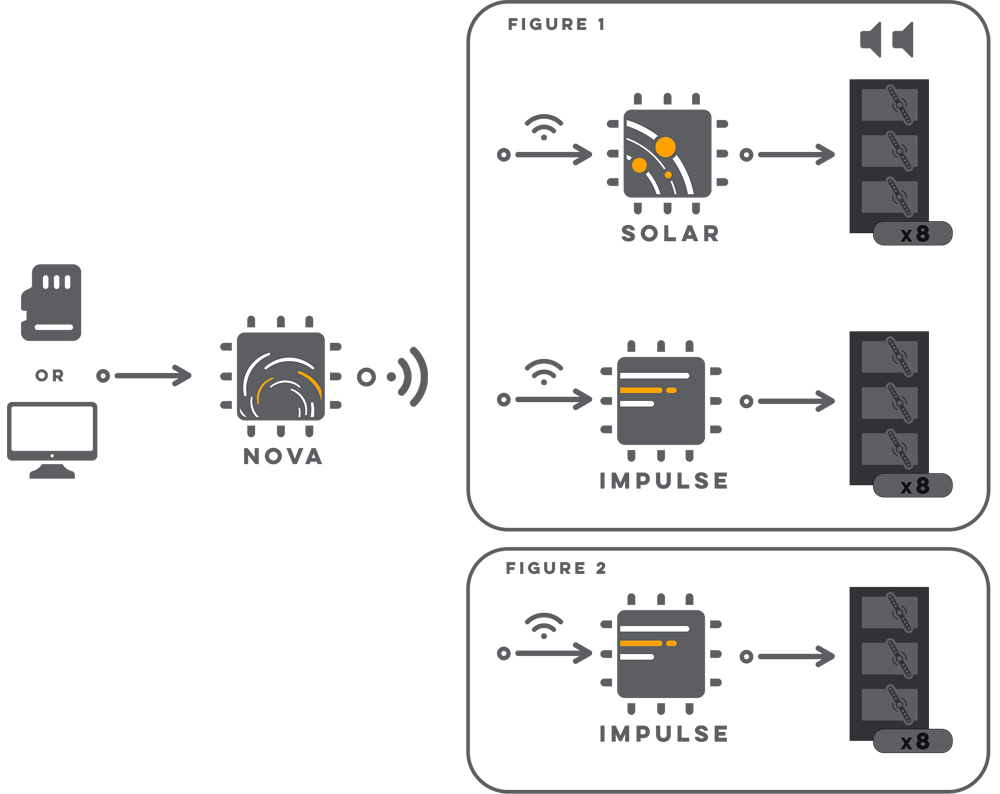
When Bottango Nova triggers a show, it will send the animation data to the connected Bottango Solar and Bottango Impulses. You can connect Bottango Nova to the other three control boards wirelessly (as shown in the diagram above), or using the wired RS485 communication option. RS485 wired board-to-board communication is currently supported in hardware, and software support is in development. Whether wireless or wired is the better option for you depends on your setup.
To trigger animations with your own custom logic, you’d use the open-source firmware Bottango provides and modify it for your needs. The same open-source firmware that Bottango provides with the Bottango application runs on Bottango’s control board lineup. See Callbacks File Overview and Modifying the Firmware for more details.
You would modify the firmware for the Bottango Nova show controller to follow your own custom show triggering logic. You could use the eight additional GPIO pins on Bottango Nova to listen to external triggers, or set a playlist of animations to play with a timer between shows, as a few examples.
Note: It is possible to use Bottango Solar as the show controller, audio player, and servo driver for one figure, eliminating the need for Bottango Nova. However, that configuration would add additional complexity, and may not be as robust as a dedicated show controller using Bottango Nova.
Five Small Figures, All Wirelessly Controlled
Section titled “Five Small Figures, All Wirelessly Controlled”“I’m building an experience with five small figures. Each only has three servos, but they are located throughout a room, not all next to each other. I want to be able to control all of them wirelessly without connecting each to my computer. I’m ok keeping a computer connected to run things. I can just use the audio output of my computer, I don’t need speakers on the figures.”
-
My build uses 15 servos, but they are split across 5 small, 3-servo figures.
-
I will animate and play back animations using a connected computer.
-
I want to control all 5 figures wirelessly without connecting all 5 to the computer.
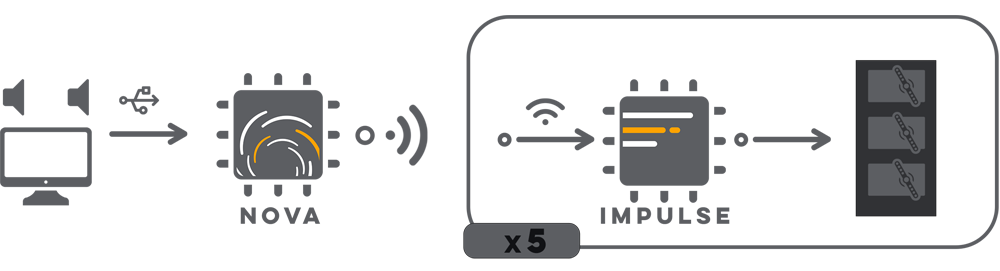
Recommended Hardware:- 1x Bottango Nova- 5x Bottango ImpulseIn this setup, each of the small figures would run off a Bottango Impulse, using 3 of the 10 servo headers. Since audio and show control is handled by a single computer, we don’t need a Bottango Solar, and we don’t need to use Bottango Nova as a show controller.
However, to enable the wireless connection, we’ll still use a Bottango Nova. We’ll set up Bottango Nova as a wireless bridge, connected to the computer. It will create a low-latency wireless direct connection point, and the five Bottango Impulse boards will connect directly to it. Bottango Nova will serve animations from the computer wirelessly to the five Bottango Impulse boards, and relay their responses back to the computer.
Unique Effector, Bottango Hardware
Section titled “Unique Effector, Bottango Hardware”“I have two effectors I want to control. Each effector can be controlled using three GPIO pins. Bottango doesn’t support this effector out of the box, but the Bottango software provides the tools I need to animate it. I want to lean into Bottango hardware that can export animations and work easily with the software, rather than custom-building a control solution by mixing and matching off-the-shelf components.”
-
My build uses two effectors that aren’t supported out of the box by Bottango. To control those effectors, I need three GPIO pins each.
-
I want to store animations and play them without a computer.
-
I want to lean into Bottango hardware rather than create my own custom build solution.
Recommended Hardware:- 1x Bottango NovaWith the 8 exposed 3.3 V ESP32 GPIO pins, Bottango Nova can act as a sort of hybrid between a general-purpose development board and a purpose-built Bottango animatronic control board. You’ll get all the advantages of a Bottango Nova, and by using the open-source firmware, you can take advantage of the GPIO pins the same way you could with a general-purpose development board.

Of course, you can also build your own solution using an off-the-shelf development board and the open-source firmware.
Endless Possibilities
Section titled “Endless Possibilities”The above are just some examples meant to illustrate possible configurations, not an exhaustive list of everything you can do with Bottango’s controls lineup. Not sure what the best combination of hardware is to reach your goal? Ask questions in the Bottango Discord Community.